Maya Notes Plugin: Persistent Scene Annotations with Custom Node Architecture
Overview
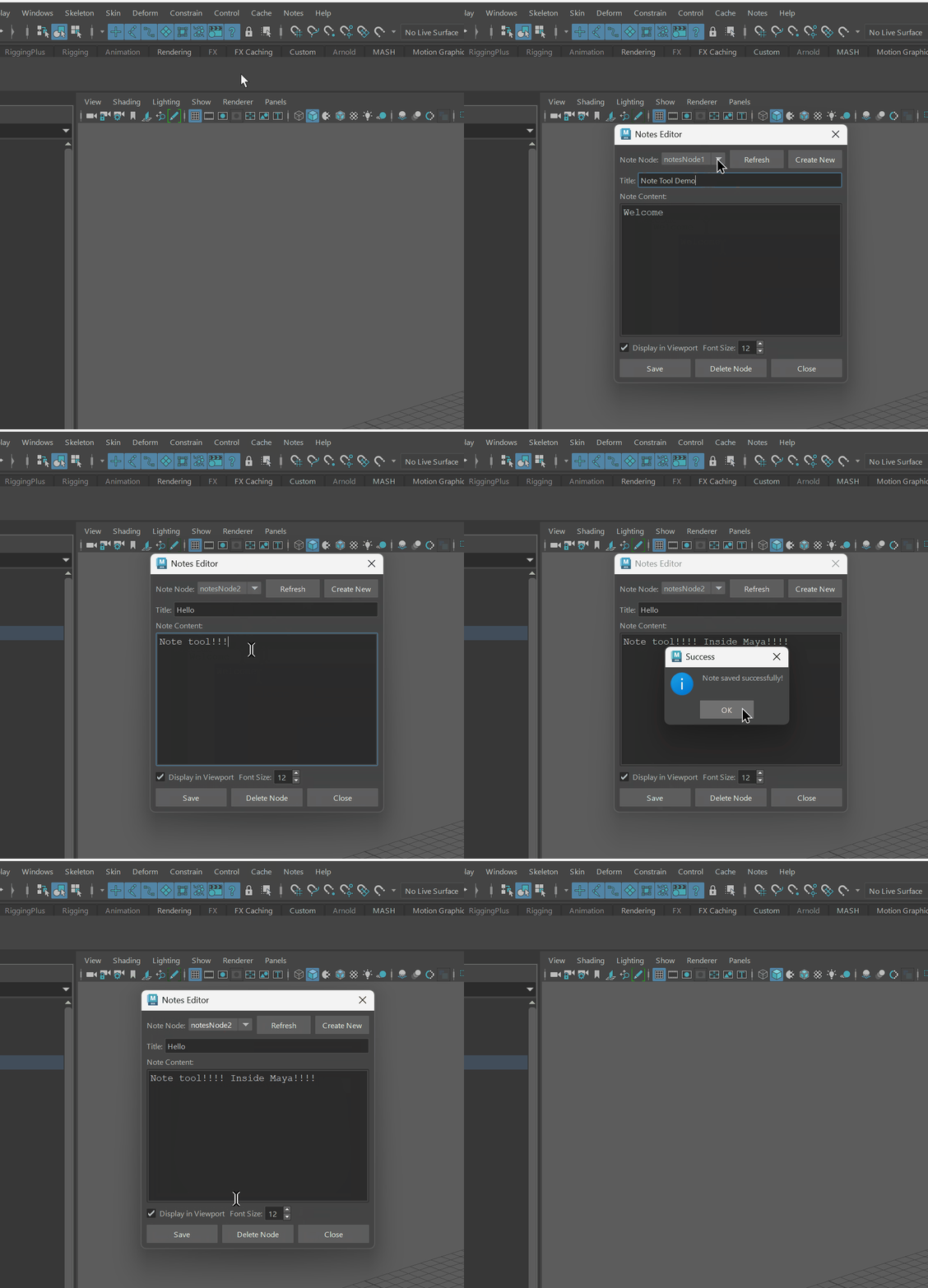
Maya Notes Plugin is a production-ready tool that embeds persistent text annotations directly into Maya scene files using a custom locator node architecture. The plugin provides a floating, always-on-top text editor with real-time viewport display, enabling artists to document scene state, leave TODO lists, and maintain project continuity—eliminating the need for external documentation files that become desynchronized from scene files.
Problem & Motivation
Pain Points Solved:
- Lost Context: Opening a scene weeks later with no memory of what needs to be done or what's broken
- No Native Note Storage: Maya has no built-in system for scene-level annotations—artists resort to external text files that get lost or outdated
- Collaboration Friction: Team members can't see previous artist's notes, leading to duplicate work or missed issues
- TODO Management: No centralized place to track incomplete work within the scene itself
This plugin transforms Maya scenes into self-documenting files where notes travel with the scene, ensuring every artist who opens the file knows exactly what to work on next.
Technical Architecture
Custom Node Design (Maya API 2.0)
Built using MPxLocatorNode base class with custom attributes:
- noteText (String): Main annotation content
- noteTitle (String): Human-readable identifier
- displayInViewport (Boolean): Toggle viewport overlay
- fontSize (Integer): Viewport text size (8-72pt)
- textColor (RGB): Customizable display color
Viewport 2.0 Draw Override
Implements MPxDrawOverride for real-time viewport text rendering:
- prepareForDraw(): Extracts node attributes via MPlug API
- addUIDrawables(): Renders text overlay using MUIDrawManager
- Supports multi-line display with automatic line breaking
Qt-Based Editor Interface
PySide2 dialog with WindowStaysOnTopHint flag:
- Auto-positions to right side of Maya window on startup
- Dropdown selector for switching between multiple note nodes
- Plain text editor with Courier font for code/script snippets
- Real-time attribute synchronization via cmds.setAttr()
Organizational Structure
Notes are organized under a locked "NOTES" group in the outliner:
- Transform nodes automatically named "note_[Title]" based on content
- Group transforms locked to prevent accidental movement
- Clean outliner hierarchy for easy scene management
Implementation Methods
1. Maya API 2.0 Plugin Registration
2. Attribute Creation with Function Sets
3. Viewport Drawing Pipeline
4. Qt Signal-Slot Event Handling
5. Auto-Startup Integration
Key Features
- Scene-Embedded Storage: Notes saved directly in .ma/.mb files—no external files needed
- Always-On-Top Editor: Stays visible while working in viewport
- Auto-Launch: Editor opens automatically when Maya starts
- Multiple Notes: Create unlimited notes per scene with dropdown switching
- Viewport Overlay: Display notes as 3D text overlays (toggleable)
- Organized Outliner: Notes grouped under locked "NOTES" parent for clean hierarchy
- Dynamic Naming: Transform nodes auto-rename based on note title
Use Cases
- Production TODO Lists: Track incomplete animations, broken rigs, or placeholder assets
- Technical Documentation: Store setup instructions, script snippets, or render settings
- Collaboration Notes: Leave messages for other artists about scene state or known issues
- Version Control: Document what changed between scene versions
- Asset Handoff: Include rigging instructions or deformation warnings for animators
Current Limitations
- Viewport Performance: Text rendering may impact FPS with many notes visible
- Limited Formatting: Plain text only—no rich text or Markdown support
- No Search: Must manually browse notes via dropdown
- Single Editor Instance: Can't view multiple notes simultaneously
Future Development
- Enhanced UI: Dockable editor panel, tabbed interface for multiple notes, search/filter functionality
- Rich Text Support: Markdown rendering, code syntax highlighting, embedded images
- Template System: Pre-defined note templates for common tasks (shot checklist, rig QA, etc.)
- Timeline Integration: Frame-specific notes that appear at keyframes
- Export/Import: Batch export notes to PDF/HTML reports
- Cloud Sync: Optional cloud backup for notes across team members
- Asset Browser: Scene-wide note overview panel with categorization
Impact
Maya Notes Plugin demonstrates how custom node architecture can extend Maya's core functionality to solve real production pain points. By embedding documentation directly into scene files, it eliminates the context-switching cost of external note-taking tools and ensures critical information never gets lost. This is especially valuable in team environments where scene handoffs are common, or for solo artists returning to projects after long breaks.
Tech Stack
Project Type: Production Tool Development
Status: Active Development
Developed: November 2024
Technical References
- Autodesk. (2023). Maya Python API 2.0 Reference. Available at: Maya API Documentation
- Autodesk. (2023). Viewport 2.0 API for Python. Available at: Viewport 2.0 Documentation
- Qt Company. (2024). PySide2 Documentation. Available at: PySide2 Docs
- "Developed with technical assistance from Claude (Anthropic)."